Plotting with Plots
NMRTools contains recipes for plotting common types of spectra, using the Plots package.
For Makie-based plotting with nmrplot and nmrplot!, see Plotting with Makie.
Plotting a 1D spectrum
Load and plot an example 1D ¹⁹F spectrum using the loadnmr and plot commands:
using NMRTools, Plots
spec = exampledata("1D_19F")
plot(spec)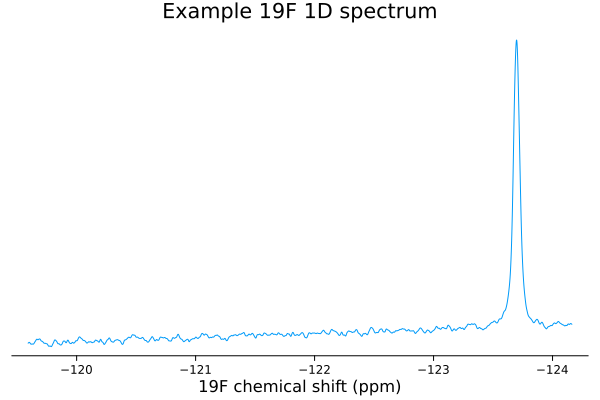
By default, plots are titled using the label generated when the data are loaded, which in turn comes from the first line of the title file. Titles can be removed by specifying title="" in the plot command (and the title can be changed in the same manner).
The plot colour can be modified by specifying e.g. c=:black in the plot command.
plot(spec, title="", c=:black)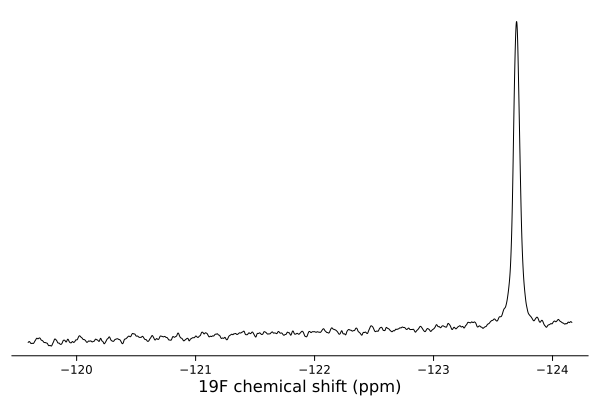
Zooming in / setting plot limits
The plot range can be set using the usual xlims argument or command, e.g. passing xlims=[-124,-122] as an option to the plot command.
Alternatively, the region of interest can be selected before plotting using the NMRTools .. selector:
plot(spec[-124 .. -123])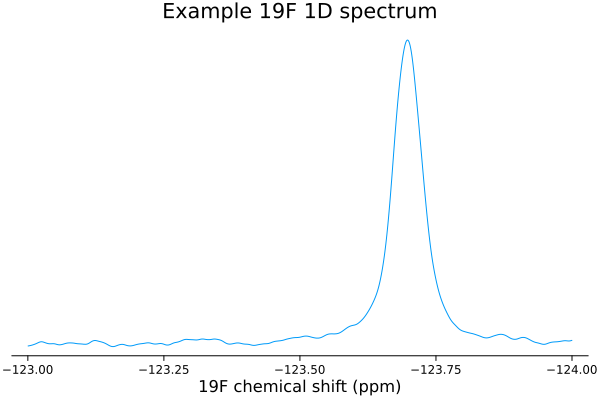
There are two advantages of this approach. If xlims are set, the y axis will be scaled to fit the entire spectrum, including regions that are not actually displayed — this may not show your data at its best. If the data are selected before plotting, the y axis is scaled according only to the selected region. For large spectra, pre-selecting a subset also reduces figure sizes.
Overlaying multiple 1D spectra
Multiple experiments can be loaded from a list of filenames using the map function.
# create a list of bruker experiment directories
filenames = ["my_experiment/1",
             "my_experiment/2",
             "my_experiment/3",
             "my_experiment/4",
             "my_experiment/5",
             "my_experiment/6",
             "my_experiment/7",
             "my_experiment/8",
             "my_experiment/9",
             "my_experiment/10",
             "my_experiment/11"]
spectra = map(loadnmr, filenames)
This creates a vector of NMRData objects containing the individual spectra. To plot this series, pass the list to the plot function:
plot(spectra, xlims=(-125, -122))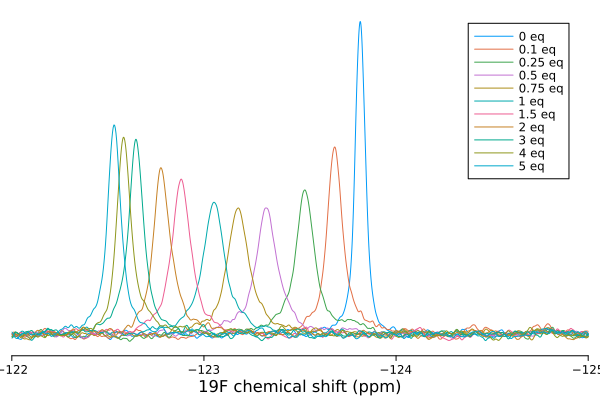
By default, spectra are normalized according to the number of scans and receiver gain determined automatically from the spectrum metadata; this can be disabled with the normalize=false option
Legends are produced from the first line of the spectrum title file. The legend can be disabled using the legend=nothing option. To re-label a spectrum, use label!(spectrum, "new label") (or for a list of experiments, the i-th spectrum can be relabelled with label!(spectra[i], "new label")).
Stacked views can also be produced using the vstack=true option. By default, spectra are normalized according to the number of scans and receiver gain determined automatically from the spectrum metadata
plot(spectra, xlims=(-125, -122), legend=:topright, vstack=true)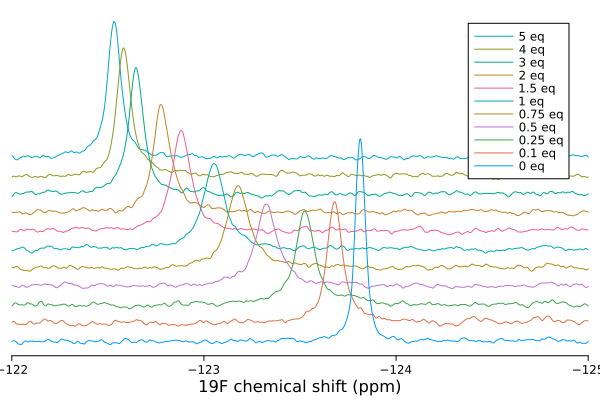
The spacing of stacked views can be adjusted by passing a scaling factor to the vstack=X option. By default, vstack=true uses a scaling factor of one. Use a larger number to increase the separation between spectra.
plot(spectra, xlims=(-125, -122), legend=:topright, vstack=5)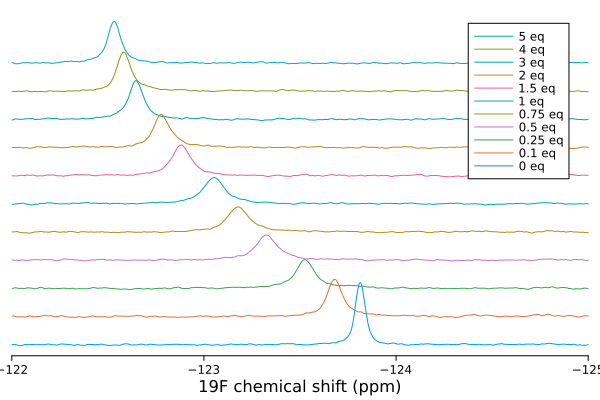
Plotting 2D spectra
2D spectra can be loaded and plotted in the same way as for 1D experiments:
spec2d = exampledata("2D_HN")
plot(spec2d)
xlims!(6, 9.5)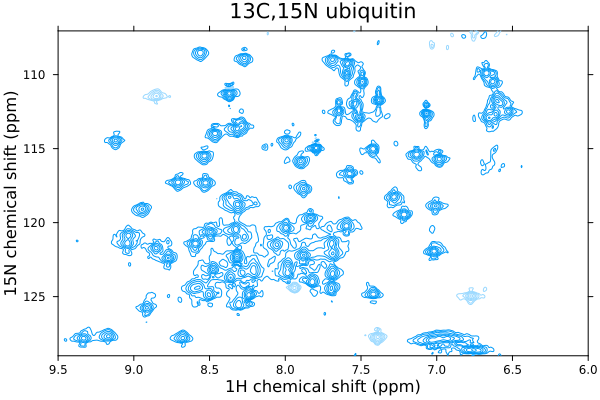
As for 1Ds, plots are titled using the label generated when the data are loaded. Positive and negative contour levels are generated starting from five times the noise level.
Contour levels can be adjusted by multiplying or dividing the spectrum by a scaling factor — the noise level stored within the spectrum metadata is not updated, so the contour levels will change accordingly.
The plot colour can also be modified by specifying e.g. c=:purple in the plot command. By default, the requested colour will be used to generate a lighter shade for negative contours. Negative contours can be turned off with negcontours=false:
plot(spec2d / 3, c=:purple, negcontours=false)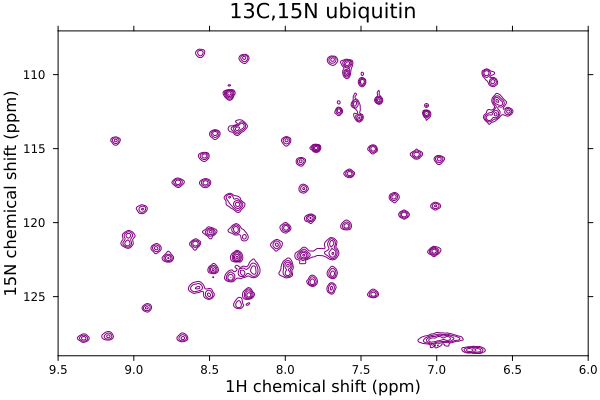
Negative contour colours can be specified separately with negcolor:
plot(spec2d, c=:black, negcolor=:red)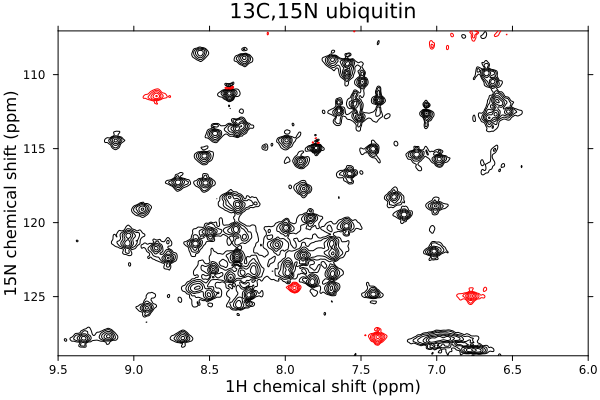
Spectra can also be plotted in other formats, e.g. heatmaps:
heatmap(spec2d[8 .. 8.5, 120 .. 125] / spec2d[:noise], cbar=:right, cbtitle="SNR")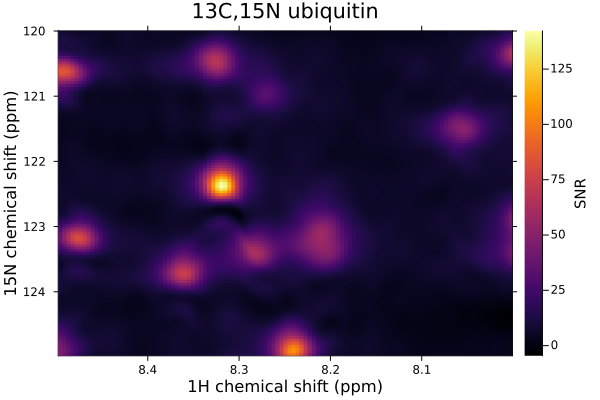
Overlaying multiple 2D spectra
Multiple 2D experiments can be loaded from a list of filenames using the map function.
filenames = ["titration_experiment/1",
             "titration_experiment/2",
             "titration_experiment/3",
             "titration_experiment/4",
             "titration_experiment/5",
             "titration_experiment/6",
             "titration_experiment/7",
             "titration_experiment/8",
             "titration_experiment/9",
             "titration_experiment/10",
             "titration_experiment/11"]
spectra2d = map(loadnmr, filenames)
These can be plotted by passing the list of spectra to the plot function, with automatic normalisation for varying numbers of scans and receiver gain:
plot(spectra2d / 2, legend=:topleft, xlims=(8.1,8.6), ylims=(119.5,124.5))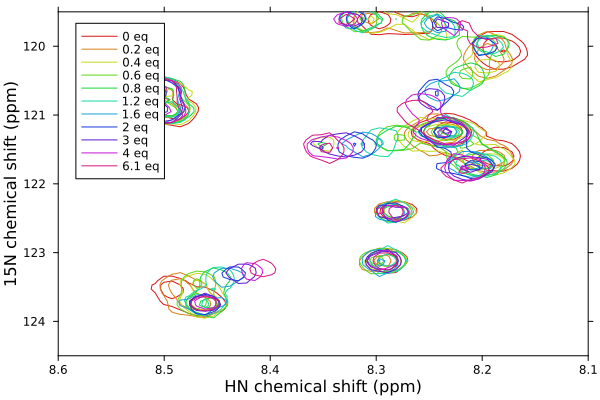
A gradient of colours will automatically be generated when spectra are plotted in this way, and a legend generated from spectrum labels.
A list of colours can be passed for plotting. This will cycle if there are more spectra than colours in the list.
plot(spectra2d[[1,11]], c=[:blue, :red], xlims=(8.1,8.6), ylims=(119.5,124.5))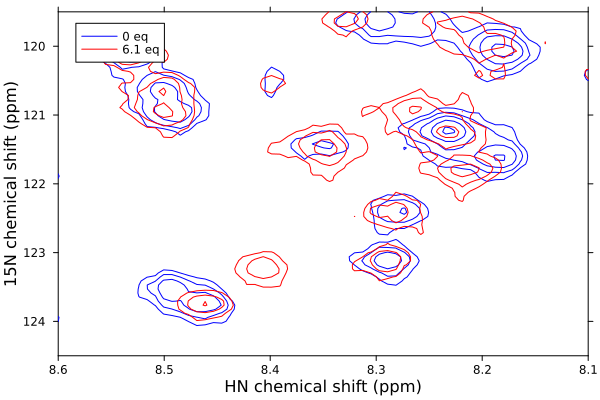
Normalization
Normalization controls how spectra are scaled when plotted, ensuring fair comparisons between experiments acquired with different parameters. Normalization primarily makes a difference when plotting multiple spectra together. For single spectra, the normalization factor only affects the absolute y-axis values, not the appearance of the plot.
For 1D spectra, the normalize keyword argument controls automatic scaling:
plot(..., normalize=true)(default): Spectra are normalized according to the number of scans and receiver gain, calculated internally via thescalecommand. If concentration metadata is available, it will also be included in the normalization.plot(..., normalize=false): Each spectrum is plotted with its raw intensity values, without any automatic scaling adjustments.
For 2D spectra, normalization affects both the intensity scaling and the contour level calculation:
plot(..., normalize=true)(default): Spectra are normalized by thescalefactor (accounting for number of scans and receiver gain), and contour levels are set to 5× the noise level. When plotting multiple spectra together, contour levels will be set based on 5× the noise level of the first spectrum, ensuring consistent contour spacing across all spectra in the series.plot(..., normalize=false): Each spectrum is plotted individually with contour levels relative to its own noise level (5× noise). This can result in different contour spacing between spectra in a series.plot(..., normalize=reference_spectrum): All spectra are scaled to match the reference spectrum. Contour levels are set based on the reference spectrum's noise level. The reference spectrum does not need to be included in the plot itself, which can be useful for creating animations with consistent scaling across frames.
It is usually easiest to plot a series of 2D spectra by passing a list of spectra in a single plot call, rather than adding them to a plot one-by-one using the plot! command. Alternatively, a reference spectrum should be specified to ensure consistent normalization.
Example: Using a reference spectrum for normalization
# Load a series of 2D spectra
spectra2d = exampledata("2D_HN_titration")

# Plot spectra 2-5, but normalize to spectrum 1
plot(spectra2d[2:5], normalize=spectra2d[1])
Plotting pseudo-2D data
Plot recipes are available for pseudo-2D data like diffusion, relaxation or kinetics.
# load a diffusion measurement, processed in topspin using xf2
diffusiondata = exampledata("pseudo2D_XSTE")

# set the gradient strengths - which varied from 2% to 98% of the max, over 10 points
diffusiondata = setgradientlist(diffusiondata, LinRange(0.02, 0.98, 10))

# generate a 3D plot of the data
plot(diffusiondata, xlims=(6,10))
┌ Warning: a maximum gradient strength of 0.55 T m⁻¹ is being assumed - this is roughly correct for modern Bruker systems but calibration is recommended
└ @ NMRTools.NMRBase ~/work/NMRTools.jl/NMRTools.jl/src/NMRBase/nmrdata.jl:306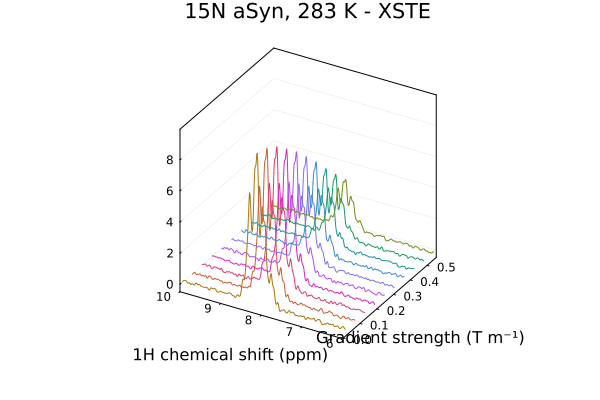
By default, the plot command will generate a 3D plot for pseudo-2D experiments. Heatmaps can also be generated using the heatmap command. In this example, we have selected the range to plot directly, rather than using the xlims option.
heatmap(diffusiondata[7..9,:])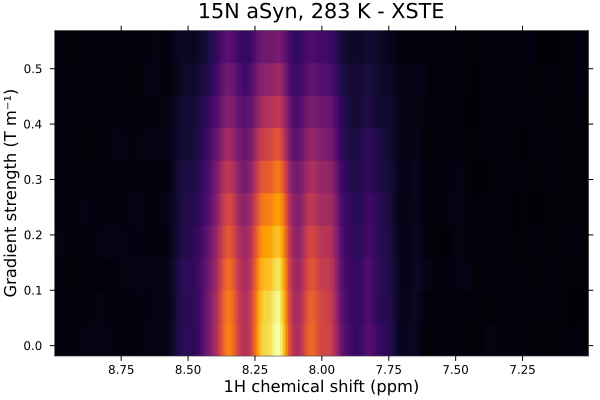
Colours
Colours can be specified using named colour symbols from the Colors.jl library, which is included with Plots.jl. The following named colours are commonly used:
colours = [:black, :red, :dodgerblue, :limegreen, :lightgrey,:orange, :hotpink, :purple]
ps = [plot(spec[-124.5 .. -123.5], c=c, title=string(c), titlefontsize=9,
           legend=false, xaxis=false, yaxis=false, ticks=nothing, border=:none)
      for c in colours]
plot(ps..., layout=(2, 4), size=(600, 200))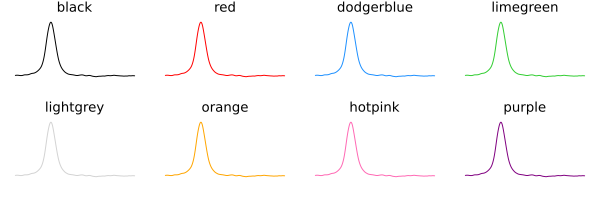
Any valid Plots.jl colour specification can be used, including:
- Named symbols:
:black,:red,:dodgerblue,:limegreen,:lightgrey,:orange,:hotpink,:purpleand hundreds more - RGB values:
RGB(0.2, 0.4, 0.8) - Hex strings:
"#4A8BC4"
For 2D spectra, the c argument sets the colour of the positive contours. Negative contours default to a lighter shade of the same colour, but can be set independently with negcolor:
plot(spec2d, c=:navy, negcolor=:red)Saving plots
All plots can be saved as high quality vector graphics, or as PNG files, using the savefig command.
savefig("myspectrum.pdf")
savefig("myspectrum.svg")
savefig("myspectrum.png")
Plot options reference
1D spectra
| Keyword | Type | Default | Description |
|---|---|---|---|
title | String | from spectrum label | Plot title. Pass "" to suppress. |
c / color | Color | auto | Line colour. |
normalize | Bool | true | Scale by number of scans and receiver gain. |
vstack | Bool or Number | false | Stack spectra vertically. Pass a number to adjust spacing. |
xlims | Tuple | auto | Chemical shift range to display (ppm). |
legend | Symbol | auto | Legend position (e.g. :topright). Pass nothing to suppress. |
2D spectra
| Keyword | Type | Default | Description |
|---|---|---|---|
title | String | from spectrum label | Plot title. Pass "" to suppress. |
c / color | Color | auto | Positive contour colour. |
negcontours | Bool | true | Show negative contours. |
negcolor | Color | lighter shade of c | Negative contour colour. |
normalize | Bool or NMRData | true | Scale by scans/gain, or normalize relative to a reference spectrum. |
xlims | Tuple | auto | Chemical shift range in the direct dimension (ppm). |
ylims | Tuple | auto | Chemical shift range in the indirect dimension (ppm). |
legend | Symbol | auto | Legend position. Pass nothing to suppress. |